Article
Mastering Pivot and Unpivot in BigQuery
BigQuery provides robust support for Pivot and Unpivot operations, allowing you to transform rows into columns and vice versa. These operations are essential for reshaping datasets for reporting, visualization, or downstream analysis.
In this guide, we explore:
- The syntax for PIVOT and UNPIVOT in BigQuery.
- Real-world examples with inputs, queries, and outputs.
- Practical use cases for these transformations.

1. Pivoting data
The PIVOT operator in BigQuery transforms rows into columns based on specific values in a column. This is particularly useful for summarizing or aggregating data by distinct categories.
Syntax
SELECT * FROM table
PIVOT (aggregation_function(input_column) FOR pivot_column IN (value1, value2, ...));
Example: Pivot sales data by region
Input
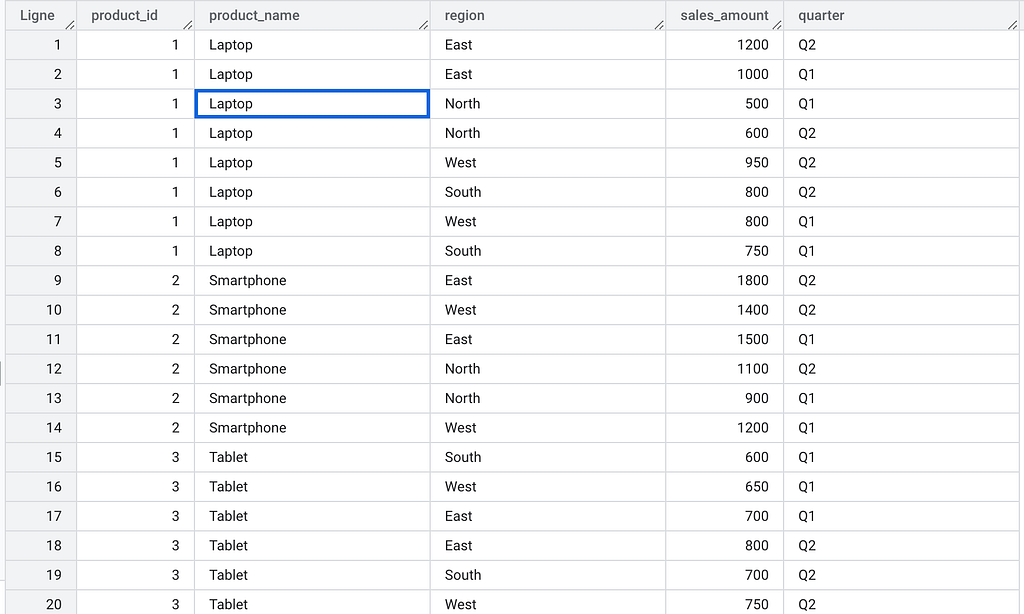
Query
WITH data_set AS (
    SELECT
        product_name,
        sales_amount,
        region
    FROM
        `project_id.dataset.sales`
    WHERE
        quarter = "Q1"
)
SELECT
    *
FROM
    data_set pivot (SUM(sales_amount) FOR region IN ('East', 'West', 'North', 'South'))
Output

Explanation
- The PIVOT operator converts the region column values into new columns: East, West, North, and South.
- The sales amounts are summed for each product and region.
- Note that a subquery is not required when pivoting a table directly.
Use cases
- Summarizing sales or KPIs across multiple dimensions like regions or product categories.
- Creating dashboards where columns represent categories.
Example: Using aliases for pivot columns
Query
WITH data_set AS (
  SELECT
    product_name,
    sales_amount,
    region
  FROM  `project_id.dataset.sales`
  WHERE quarter = "Q1"
)

SELECT
  *
FROM data_set
PIVOT (
  SUM(sales_amount) FOR region IN ('East' AS eastern_region, 'West' AS western_region)
);
Output

2. Unpivoting Data
The UNPIVOT operator in BigQuery transforms columns into rows, enabling you to normalize data for easier analysis.
Syntax
SELECT * FROM table
UNPIVOT (unpivot_column FOR unpivot_alias IN (column1, column2, ...))
Example: Unpivot product sales data by region
Input

Query
SELECT product_id, region, sales_amount
FROM `project_id.dataset.sales_summary`
UNPIVOT (
  sales_amount FOR region IN (East, West, North, South)
)
Output
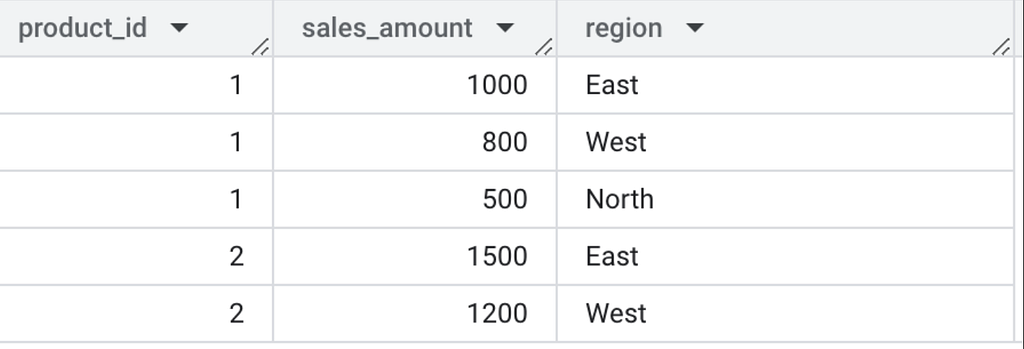
Explanation
- The UNPIVOT operator converts column values (East, West, North, South). into rows under the region column.
- Corresponding sales values are placed in the sales_amount column.
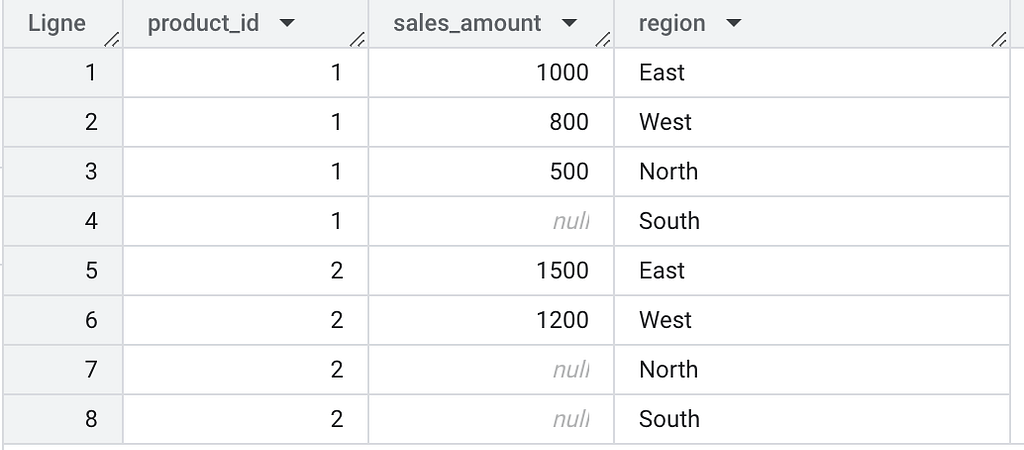
- By default, rows with NULL values are excluded, unless UNPIVOT INCLUDE NULLS is specified.
Including NULL values
SELECT
    *
FROM
    project_id.dataset.sales_summary unpivot include nulls (
        sales_amount FOR region IN (
            east,
            west,
            north,
            south
        )
    )
This would include NULL values in the output:
3. Important Rules for PIVOT
1. The aggregate function:
— Must be a standard aggregate function (SUM, COUNT, AVG, MAX, MIN)
— Can only take one argument (except COUNT(*))
— Must ignore NULL inputs (except COUNT)
2. The input column:
— Cannot reference columns defined by the PIVOT clause itself
— Must be of a groupable type
— Cannot contain aggregate or window functions
3. The pivot column values:
— Must be constants (not variables or parameters)
— Should use aliases when there might be name collisions
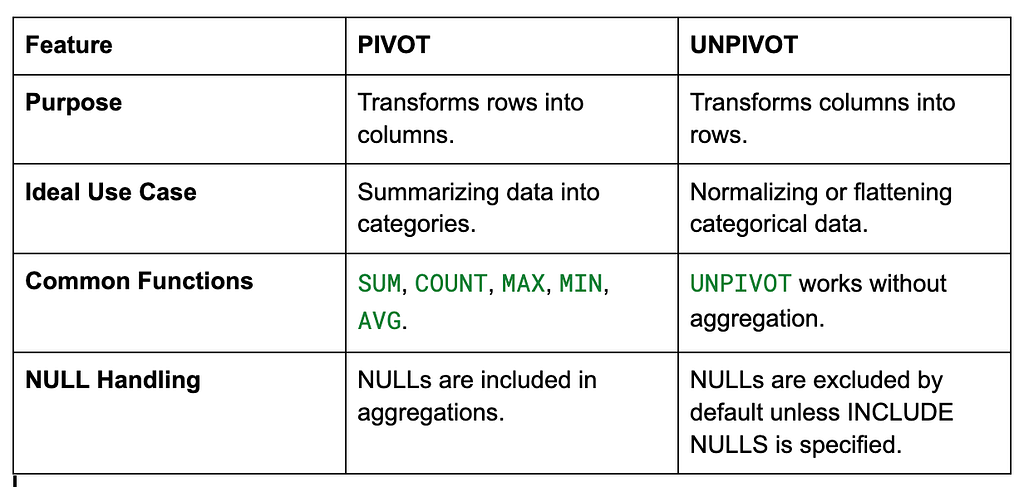
Comparison: PIVOT vs UNPIVOT
Conclusion
BigQuery’s PIVOT and UNPIVOT functions make it easy to transform and reshape data for complex analyses, reporting, and downstream processing. By mastering these tools, you can effectively handle both summary-level and normalized datasets.
Enjoy the deep dive? Clap on Medium to back the research and keep these technical notes visible for analytics engineers who need them.