Article
Mastering SQL window functions: Unlock advanced analytics like a pro

As an Analytics Engineer working with e-commerce data, I see too many analysts aggressively GROUP BY their data to find insights, effectively throwing away valuable row-level context.
Window functions are the antidote. They allow you to perform sophisticated calculations — like revenue rankings, cumulative totals, and moving averages— while preserving the individual order or customer details.
Below is your masterclass on NTILE, CUME_DIST, DENSE_RANK, PERCENT_RANK, ROW_NUMBER, RANK, and BigQuery’s secret weapon, APPROX_QUANTILES.
We are running this on a synthetic dataset modified for pedagogical purposes.
1. NTILE(4): Instant customer segmentation
The concept: NTILE(n) divides your dataset into n approximately equal buckets. In e-commerce, simpler is often better. Instead of complex clustering algorithms, NTILE(4) instantly segments your orders into quartiles — the fastest way to identify your top 25% versus your bottom 25%.
The code:
SELECT
    order_id,
    customer_name,
    product_name,
    final_amount,
    NTILE(4) OVER (ORDER BY final_amount DESC) AS revenue_quartile
FROM `your-project.dataset.shopify_orders`
WHERE order_status = 'completed'
ORDER BY final_amount DESC LIMIT 20;
The insight:
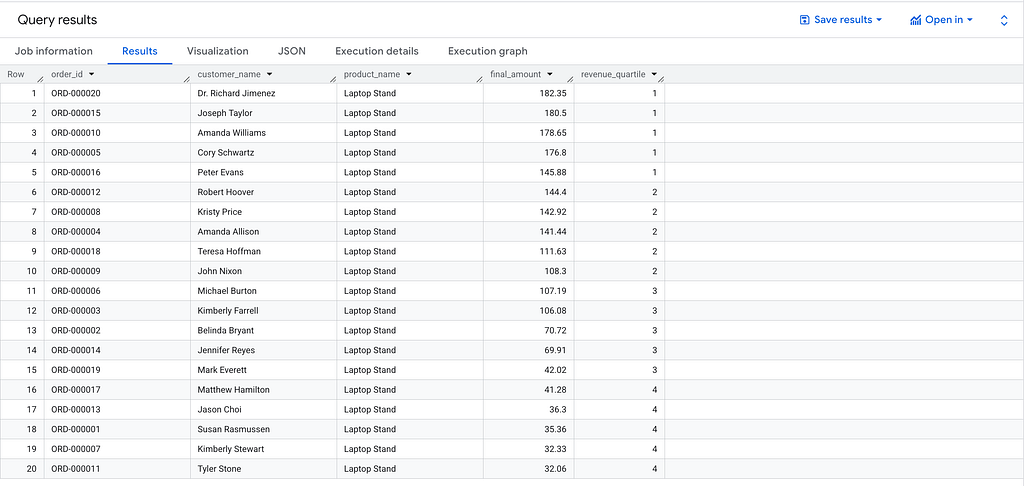
- Quartile 1 represents your highest-value orders
- In many e-commerce contexts, the top quartile often represents a disproportionate share of total revenue, consistent with Pareto-like distributions commonly observed in customer value analysis.
- Action: Prioritize retention campaigns for Q1 customers; optimize acquisition spend based on quartile performance
2. CUME_DIST(): Relative position analysis
The concept: CUME_DIST calculates the cumulative distribution of a value within a dataset. It answers: “What percentage of orders are less than or equal to this current order?”
Unlike a simple rank, this gives you the proportional position of each order relative to your entire dataset.
The code:
SELECT
    order_id,
    final_amount,
    -- Returns a value between 0 and 1
    ROUND(CUME_DIST() OVER (ORDER BY final_amount ASC), 4)
        AS percentile_position
FROM `your-project.dataset.shopify_orders`

WHERE order_status = 'completed'

ORDER BY final_amount DESC LIMIT 10;
The insight:

- If a $180.50 order has a CUME_DIST of 0.95, it means this order value is higher than 95% of all other orders
- Important: Ties affect the calculation. Multiple orders with identical values will share the same cumulative distribution value (the highest one in the tie group)
3. DENSE_RANK(): The “leaderboard” logic
The concept: When creating product leaderboards, standard ranking can create gaps. If two products tie for 1st place, RANK() skips 2nd and jumps to 3rd. DENSE_RANK() eliminates these gaps — if two products tie for #1, the next product is #2.
The code:
SELECT
    product_name,
    ROUND(SUM(final_amount), 2) AS total_revenue,
    DENSE_RANK() OVER (ORDER BY SUM(final_amount) DESC) AS ranking
FROM `your-project.dataset.shopify_orders`
WHERE order_status = 'completed'
GROUP BY product_name
ORDER BY total_revenue DESC;
The insight:

- Use case: Ideal for “Top N” lists displayed on dashboards or reports
- Why it matters: Stakeholders prefer clean, sequential hierarchies (1, 2, 3, 4…) over rankings with gaps (1, 1, 3, 5…)
4. PERCENT_RANK(): Finding the “Top X%”
The concept: PERCENT_RANK assigns a percentile rank between 0 and 1, making it intuitive for “Top X%” filtering. It calculates where a value falls in the ordered dataset as a percentage.
The code:
SELECT
    order_id,
    final_amount,
    ROUND(PERCENT_RANK() OVER (ORDER BY final_amount DESC), 4) AS pct_rank
FROM `your-project.dataset.shopify_orders`
WHERE order_status = 'completed'
ORDER BY final_amount DESC LIMIT 10;
The insight:
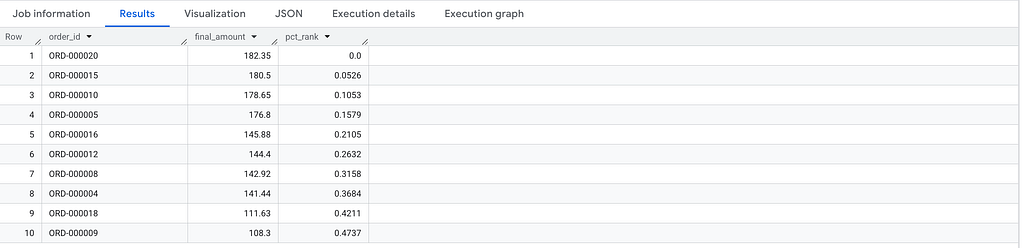
- Logic: A pct_rank of 0.05 means this order is in the top 5th percentile.
- Action: Filter WHERE pct_rank <= 0.10 to instantly isolate your top decile of orders for deep-dive analysis without hard-coding specific dollar amounts.
5. LAG() and LEAD(): Time-series comparison
The concept: LAG() accesses the previous row’s value, LEAD() accesses the next row’s value. Essential for calculating period-over-period changes without self-joins.
The code:
SELECT
    order_date,
    customer_name,
    final_amount,
    LAG(final_amount, 1) OVER (
        PARTITION BY customer_name
        ORDER BY order_date
    ) AS previous_order_amount,
    final_amount - LAG(final_amount, 1) OVER (
        PARTITION BY customer_name
        ORDER BY order_date
    ) AS amount_change
FROM `your-project.dataset.shopify_orders`
WHERE order_status = 'completed'
ORDER BY customer_name, order_date;
The insight:

- PARTITION BY customer_name: Isolates the LAG calculation within each customer’s order history, comparing only their own purchases
- NULL handling: The first purchase per customer returns NULL for previous_order_amount (no prior order exists)
- Business application: Flag customers with negative amount_change for targeted re-engagement campaigns
6. APPROX_QUANTILES: Fast percentile calculation at scale
The concept: APPROX_QUANTILES is BigQuery’s approximate quantile function. It calculates percentiles (median, quartiles, etc.) with minimal computational overhead — critical when working with millions of rows.
The code:
SELECT
    -- Splits data into 4 buckets, retrieving the breakpoints
    APPROX_QUANTILES(final_amount, 4)[OFFSET(1)] AS q1_threshold,
    APPROX_QUANTILES(final_amount, 4)[OFFSET(2)] AS median_value,
    APPROX_QUANTILES(final_amount, 4)[OFFSET(3)] AS q3_threshold
FROM `your-project.dataset.shopify_orders`The Insight:
The insight:

- Why it matters: Average Order Value (AOV) can be heavily skewed by outliers. The median provides a more robust measure of central tendency
- If your mean is $150 but your median is $45, your typical customer behavior is vastly different from what the average suggests
- Performance: According to BigQuery documentation, approximate functions can be 10–100x faster than exact calculations with controllable error margins (typically <1% for large datasets)
7. ROW_NUMBER vs RANK vs DENSE_RANK: The tie-breaker showdown
The concept: These three functions all assign rankings, but handle ties completely differently. Understanding when to use each is critical for accurate analytics.
The code:
SELECT
    order_id,
    customer_name,
    country,
    product_name,
    final_amount,

    -- Unique row number (tie-breaker arbitrary)
    ROW_NUMBER()
        OVER (PARTITION BY country ORDER BY final_amount DESC)
        AS row_number,

    -- RANK: equal values get same rank, next rank is skipped
    RANK() OVER (PARTITION BY country ORDER BY final_amount DESC) AS rank,

    -- DENSE_RANK: equal values get same rank, next rank is not skipped
    DENSE_RANK()
        OVER (PARTITION BY country ORDER BY final_amount DESC)
        AS dense_rank

FROM `your-project.dataset.shopify_orders`
WHERE order_status = 'completed'
-- and country = 'Mauritania'
The insight:
The Mauritania example: Jason Choi and Belinda Bryant both ordered exactly $31.98 in Mauritania. Watch how each function reacts:

Critical considerations:
- ROW_NUMBER: Guarantees unique values but the tie-breaking is non-deterministic unless you specify a secondary sort (e.g., ORDER BY final_amount DESC, order_id ASC)
- RANK: Like Olympic medals — two gold medals means no silver, next is bronze
- DENSE_RANK: Sequential numbering with no gaps — cleanest for dashboards
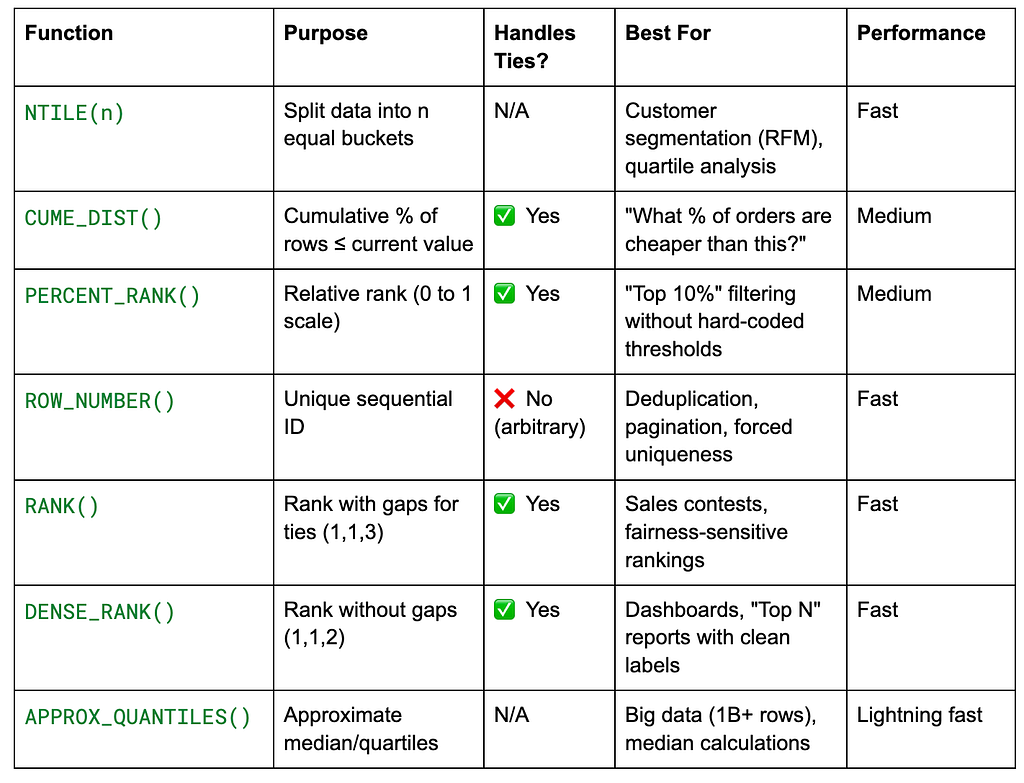
Decision framework: choosing your window function
The quick reference table
When NOT to use window functions
Use simple aggregates when:
- You need only totals/averages without row-level detail
- You’re calculating single summary metrics (e.g., overall conversion rate)
- Your downstream tool (Looker, Tableau) will re-aggregate the results anyway
Example of unnecessary complexity:
-- ❌ Overkill: Window function when GROUP BY suffices
SELECT DISTINCT
    product_name,
    SUM(final_amount) OVER (PARTITION BY product_name) AS total_revenue
FROM `your-project.dataset.shopify_orders`;

-- ✅ Simpler and faster
SELECT
    product_name,
    SUM(final_amount) AS total_revenue
FROM `your-project.dataset.shopify_orders`
GROUP BY product_name;
Bookmark this reference. The next time you reach for GROUP BY, ask yourself: "Am I throwing away valuable row-level context?" Window functions often provide a better answer.
About the author: I’m Camille Lebrun, a Data Consultant. I write about SQL optimization, data modeling, and data engineering .
View my portfolio | Connect on LinkedIn
Enjoy the deep dive? Clap on Medium to back the research and keep these technical notes visible for analytics engineers who need them.