Article
RANK() vs DENSE_RANK() vs ROW_NUMBER() — when to use which

A dashboard showed positions 1, 2, 3, 4, 5, 6, 6, 8, 9, 10. Product #7 was missing. Not a pipeline issue — two products had tied at rank 6, and RANK() jumped to 8. Leadership spent half a day trying to understand what had gone wrong.
The fix was one word. The cause was a naming problem: RANK() sounds like the default. It usually isn't.
The difference, side by side
Same data, three different functions:

ROW_NUMBER — counts sequentially regardless of ties. Arbitrary within ties.
RANK — tied rows share a rank, then the next rank jumps. Two rows at rank 2 means the next row is rank 4.
DENSE_RANK — tied rows share a rank, but the next distinct value always gets the next consecutive number. No gaps.
A useful mental model: in the Olympics, two gold medals means no silver with RANK(). With DENSE_RANK(), silver still exists.
The core query
WITH sales_rankings AS (
  SELECT
    invoice_id,
    branch,
    product_line,
    total,
    ROW_NUMBER()  OVER (ORDER BY total DESC, invoice_id ASC) AS row_num,
    RANK()        OVER (ORDER BY total DESC) AS rank_pos,
    DENSE_RANK()  OVER (ORDER BY total DESC) AS dense_rank_pos
  FROM supermarket_sales
  WHERE payment != 'Cancelled'
)
SELECT *
FROM sales_rankings
WHERE dense_rank_pos <= 10
ORDER BY total DESC;

13 rows, not 10 — and that’s the point. WHERE dense_rank_pos <= 10 guarantees 10 distinct rank positions, not 10 rows. Ties at positions 3, 5, and 6 each add a row. If you need exactly 10 rows, use ROW_NUMBER. If you need exactly 10 tiers, DENSE_RANK is correct.
When to use each
DENSE_RANK() — the default for most cases
Use it whenever a business user will read the output. Dashboards, leaderboards, segmentation tiers, Top N reports — anything where a missing position number would raise questions.
-- Top product per category
WITH ranked_products AS (
  SELECT
    product_id,
    category,
    revenue,
    DENSE_RANK() OVER (PARTITION BY category ORDER BY revenue DESC) AS category_rank
  FROM products
)
SELECT *
FROM ranked_products
WHERE category_rank = 1;

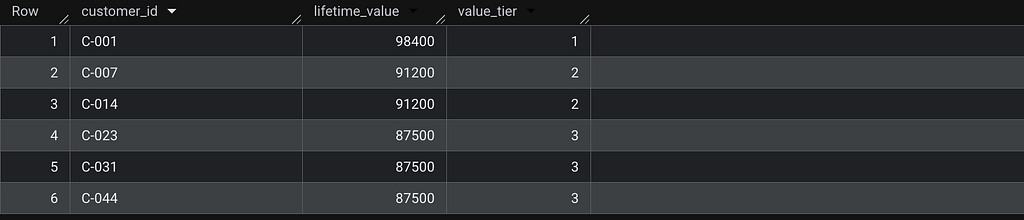
-- Customer tiers by lifetime value
WITH ranked_customers AS (
  SELECT
    customer_id,
    lifetime_value,
    DENSE_RANK() OVER (ORDER BY lifetime_value DESC) AS value_tier
  FROM customers
)
SELECT *
FROM ranked_customers
WHERE value_tier <= 3;
RANK() — when the gap carries information
The one case where RANK() is correct: limited resources with real competition, where the exact count of people ahead matters.
WITH applicant_rankings AS (
  SELECT
    applicant_id,
    name,
    score,
    RANK() OVER (ORDER BY score DESC) AS rank_pos
  FROM applicants
)
SELECT *
FROM applicant_rankings
ORDER BY score DESC;
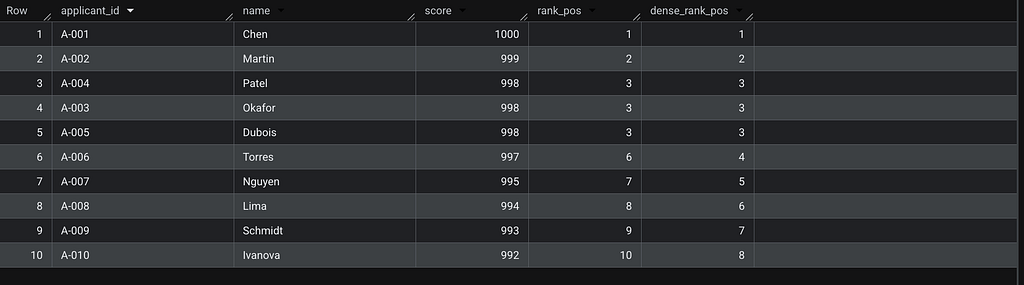
The key difference: rank_pos = 6 for Torres means exactly 5 people scored higher. dense_rank_pos = 4 means Torres is in the 4th distinct score tier — useful for grouping, but it doesn't tell you how many individuals are ahead.
When the gap represents real competition, use RANK(). Otherwise, DENSE_RANK().
ROW_NUMBER() — when you need one row, exactly
Deduplication, pagination, creating stable keys.
-- Most recent order per customer
WITH ranked_orders AS (
  SELECT
    order_id,
    customer_id,
    order_date,
    amount,
    ROW_NUMBER() OVER (
      PARTITION BY customer_id
      ORDER BY order_date DESC, order_id DESC
    ) AS rn
  FROM orders
)
SELECT order_id, customer_id, order_date, amount
FROM ranked_orders
WHERE rn = 1;

The tiebreaker problem with ROW_NUMBER()
Without a secondary sort, ROW_NUMBER() is non-deterministic when values tie. The query runs fine, returns no error, and silently picks a different row each time depending on query plan or parallelism.
The way to verify the risk is to show all candidates that could legitimately win rn=1, then compare with and without a tiebreaker:
WITH candidates AS (
  SELECT
    order_id,
    amount,
    ROW_NUMBER() OVER (ORDER BY amount DESC)                AS rn_no_tiebreaker,
    ROW_NUMBER() OVER (ORDER BY amount DESC, order_id ASC)  AS rn_with_tiebreaker
  FROM orders
)
SELECT
  order_id,
  amount,
  rn_no_tiebreaker,
  rn_with_tiebreaker
FROM candidates
WHERE amount = (SELECT MAX(amount) FROM orders)
ORDER BY order_id;

Both rows have amount = 892.0. rn_no_tiebreaker assigns 1 to O-5501 here — but BigQuery makes no guarantee. On a different query plan or a larger dataset with parallelism, O-9999 could come out first. With order_id ASC as tiebreaker, O-5501 always wins.
This is the most common cause of dbt snapshot instability and intermittent CI failures with window functions.
PARTITION BY
PARTITION BY resets the ranking for each group. Without it, ranking is global.
-- Global ranking — top 3 total
WITH global_ranked AS (
  SELECT
    customer_id,
    country,
    arr,
    DENSE_RANK() OVER (ORDER BY arr DESC) AS rank_pos
  FROM customers
)
SELECT *
FROM global_ranked
WHERE rank_pos <= 3;

-- Per-country ranking — top 1 per country
WITH country_ranked AS (
  SELECT
    customer_id,
    country,
    arr,
    DENSE_RANK() OVER (PARTITION BY country ORDER BY arr DESC) AS country_rank
  FROM customers
)
SELECT *
FROM country_ranked
WHERE country_rank = 1;

Before pushing to production
- ROW_NUMBER() without a tiebreaker — add one, and make sure it's stable as data grows
- RANK() where users will see the output — confirm gaps have meaning, otherwise switch to DENSE_RANK()
- PARTITION BY — verify the ranking resets per group as expected
- All functions — test on a small dataset with intentional ties and NULLs before running at scale
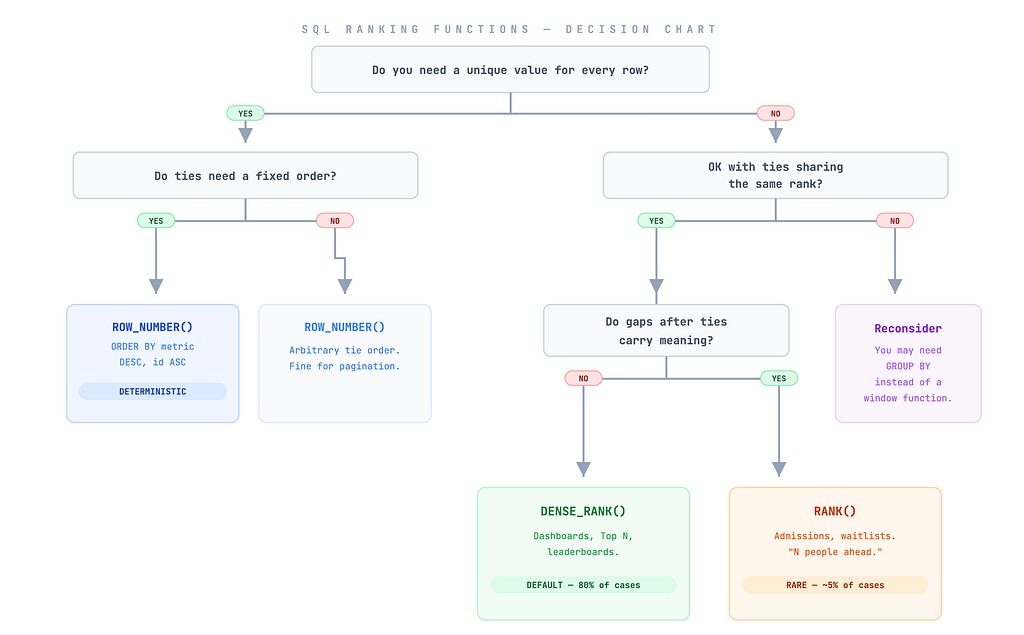
DENSE_RANK() for consecutive tiers. RANK() when the count of people ahead is the metric. ROW_NUMBER() for uniqueness, always with a tiebreaker.
About the author: I’m Camille Lebrun, a Data Consultant. I write about SQL optimization, data modeling, and data engineering .
View my portfolio | Connect on LinkedIn
Enjoy the deep dive? Clap on Medium to back the research and keep these technical notes visible for analytics engineers who need them.